AWS S3: how cheap discs became durable storage at scale

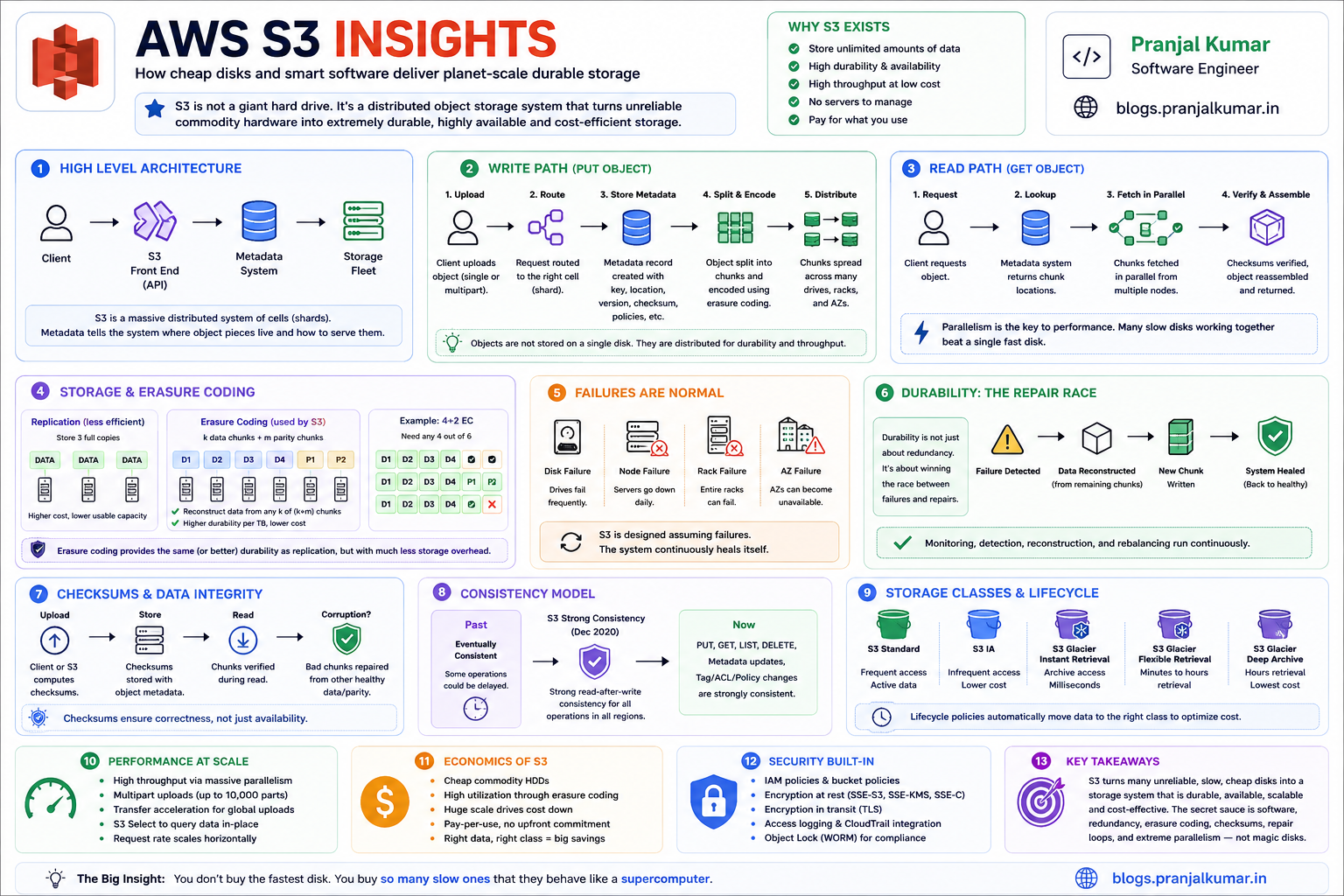 When people first hear about Amazon S3, they usually think of it as “cloud file storage.”
That description is convenient, but architecturally misleading.
S3 is not a giant hard drive in the sky. It is not a shared folder. It is not a filesystem with infinite space. And it is almost certainly not just a pile of premium SSDs waiting to serve your objects.
A better mental model is this:
S3 is a massive distributed object storage system that converts unreliable commodity hardware into durable, highly available, high-throughput storage through software, redundancy, metadata systems, erasure coding, checksums, repair loops, and extreme parallelism.
The magic of S3 is not that AWS buys the fastest discs.
The magic is that AWS operates so many discs, across so many failure domains, with so much automation, that the system behaves like something far more powerful than the sum of its parts.
Or, put more simply:
You do not buy the fastest disk. You buy so many slow ones that they behave like a supercomputer.
That sentence captures the soul of S3.
But the deeper question is:
How does a system made of ordinary failure-prone hardware deliver extraordinary reliability?
That is where S3 becomes fascinating.
Misconception: "S3 must be SSD-backed"
Many engineers assume S3 must be powered primarily by SSDs because it feels cloud-native, fast, and infinitely scalable.
But S3’s economics are fundamentally different from a low-latency database or an NVMe-backed transactional system.
SSDs are excellent when you need low-latency random I/O and high IOPS from a small number of devices.
HDDs are excellent when you need massive capacity at low cost per terabyte.
S3 is primarily an object storage system optimized for:
- Durability
- Scale
- Throughput
- Availability
- Cost efficiency
- Operational simplicity for customers
It is not designed as a single-digit millisecond random-mutation storage engine for tiny records.
The tradeoff looks like this:
SSD:
  Excellent random I/O
  Higher IOPS per device
  Lower latency
  Higher cost per TB

HDD:
  Lower random IOPS
  Great sequential throughput
  Much lower cost per TB
  Excellent for massive object storage when parallelized
S3’s brilliance is that it does not try to make one disk fast.
It makes thousands or millions of discs cooperate.
That is a completely different optimization strategy.
Parallelism over speed
If you store a large object on one disk, your read throughput is bounded by that disk.
But if you split the object into many pieces and distribute those pieces across many discs, servers, racks, and Availability Zones, you can read many fragments in parallel.
Conceptually:
Large object
   ↓
Split into shards
   ↓
Distribute across many drives
   ↓
Read shards in parallel
   ↓
Validate and reassemble object
This is why the torrent analogy is useful.
In BitTorrent, a file downloads faster because many peers provide different pieces simultaneously. S3’s internal design is not literally BitTorrent, but the high-level performance idea is similar:
Aggregate throughput comes from parallelism.
One HDD may only provide modest IOPS.
But thousands of HDDs serving predictable sequential ranges in parallel can provide enormous aggregate throughput.
This is one of the most important distributed-systems lessons:
At cloud scale, the performance unit is not the disk. It is the fleet.
A single disk is slow.
A coordinated fleet of discs can behave like a storage supercomputer.
Object storage, not a filesystem
A filesystem gives you directories, in-place mutation, file locking, append semantics, fine-grained metadata operations, and often POSIX-like behavior.
S3 gives you something different:
Bucket + key → object
An object is not just bytes. It can include:
- Object data
- Key/name
- Metadata
- Version information if versioning is enabled
- Tags
- ACL and policy-related access context
- Checksum and integrity metadata
- Encryption context depending on configuration
This object model is one reason S3 scales so well.
It avoids many of the hardest problems in distributed filesystems:
- Arbitrary in-place mutation
- Fine-grained locking
- Shared mutable file handles
- POSIX directory semantics
- Complex cross-directory consistency expectations
Instead of pretending to be a traditional disk, S3 exposes a simpler abstraction:
PUT object
GET object
DELETE object
LIST objects
That simplicity is not a limitation.
It is a scalability feature.
The less the system promises at the API layer, the more freedom it has internally to shard, replicate, encode, route, repair, migrate, and optimize.
The metadata problem
Most people think S3 is about storing bytes.
At scale, storing bytes is only half the problem.
The harder question is:
Given this bucket and key, where are the object fragments, what version is current, what policies apply, what encryption state exists, and what should the system return right now?
That is metadata.
For every GET, PUT, DELETE, LIST, lifecycle transition, replication event, or restore request, S3 needs to coordinate metadata.
A simplified S3 read path looks like this:
Client sends GET bucket/key
        ↓
Front-end request router receives request
        ↓
Authentication and policy checks happen
        ↓
Metadata/index layer resolves object location/version
        ↓
Storage fleet retrieves required data fragments
        ↓
Fragments are validated and assembled
        ↓
Object is streamed back to client
This means S3 is not just a storage fleet.
It is also a massive distributed metadata system.
And metadata systems are where distributed storage usually becomes difficult.
A system can have petabytes or exabytes of raw capacity, but if its metadata layer cannot answer location, version, permission, and lifecycle questions quickly and correctly, the storage system collapses operationally.
The hidden challenge is not only:
Where are the bytes?
It is:
What are the correct bytes for this request at this exact moment?
Durability
The beginner view of durability is:
“Store multiple copies.”
The senior-engineer view is:
“Assume discs fail, servers fail, racks fail, networks partition, software deploys go wrong, checksums catch corruption, repair systems lag, and correlated failure is the real enemy.”
At S3 scale, failure is not an exception.
Failure is the steady state.
Somewhere, a disk is failing. Somewhere else, a server is unhealthy. Somewhere else, a network device is dropping packets. Somewhere else, background repair is rebuilding redundancy.
The system cannot depend on every component being healthy.
It must be designed so that component failure is boring.
This is the core design philosophy:
Do not try to prevent all hardware failure.
Design the software so hardware failure does not matter.
That idea sounds simple until you try to implement it across millions of devices.
Replication is expensive
The simplest durability strategy is replication.
Object → copy 1
Object → copy 2
Object → copy 3
If one copy is lost, another copy survives.
Replication is easy to reason about and often fast to read from. But it has a major cost problem.
Three-way replication means storing roughly three times the data.
For small systems, that may be acceptable.
For S3-scale systems, that overhead becomes enormous.
If you store exabytes of customer data, every extra percentage point of overhead translates into a massive physical and financial cost:
More drives
More racks
More buildings
More power
More cooling
More networking
More repair traffic
More operational complexity
This is why naive replication is not enough.
S3 needs something more storage-efficient.
That something is erasure coding.
Erasure coding
Erasure coding is one of the most important ideas behind large-scale storage systems.
Instead of storing full copies of an object, the system splits the object into data shards and computes additional parity shards.
You do not need every shard to reconstruct the object.
You only need a sufficient subset.
Conceptually:
Original object
   ↓
Data shards:   D1 D2 D3 D4 D5 D6
Parity shards: P1 P2 P3
   ↓
Store shards across different drives / servers / racks / AZs
If some shards are lost:
Available: D1 D2 D4 D5 D6 P2
Missing:   D3 P1 P3

Original object can still be reconstructed.
This is the same high-level idea behind Reed-Solomon-style coding used in many distributed storage systems.
The system adds mathematically derived parity so that missing pieces can be rebuilt.
The advantage is huge:
Naive replication:
  Simple
  Fast reads
  High storage overhead

Erasure coding:
  More complex
  Requires repair math
  Much better storage efficiency
At S3 scale, storage efficiency is not a micro-optimization.
It is the business model.
Saving even a small percentage of storage overhead can mean enormous reductions in hardware, power, cooling, network, and operational cost.
This is why the story is not:
S3 stores three full copies of everything and calls it a day.
The real story is closer to:
S3 uses redundancy schemes, placement, integrity checks, and repair systems to survive failures efficiently.
The repair race
S3’s famous durability target is often described as “eleven nines.”
But the number itself is not magic.
It emerges from an engineering model involving:
- Device failure rates
- Failure detection time
- Repair throughput
- Number of redundant fragments
- Placement across independent failure domains
- Correlated failure assumptions
- Checksum validation
- Operational discipline
The deeper insight is:
Durability is a race between failure and repair.
If one drive fails, that is normal.
If ten drives fail, that is normal at cloud scale.
The dangerous case is when failures accumulate faster than the system can detect and repair lost redundancy.
So S3 needs continuous background work:
Detect failed or unhealthy devices
        ↓
Identify affected objects/fragments
        ↓
Read surviving fragments
        ↓
Reconstruct missing fragments
        ↓
Write repaired fragments elsewhere
        ↓
Verify checksums
        ↓
Update metadata
This is not a one-time recovery operation.
It is an endless repair loop.
At S3 scale, the system is never in a perfectly static healthy state. Something is always failing somewhere.
The goal is not to avoid failure.
The goal is to repair faster than failure can accumulate.
That is the real durability game.
Checksums
Durability is not only about missing discs.
It is also about silent corruption.
Bits can rot. Drives can return bad data. Network paths can corrupt packets. Software bugs can write the wrong bytes. Memory can flip bits. Firmware can misbehave.
That is why checksums matter.
A good storage system does not merely store bytes.
It stores evidence that the bytes are still the same bytes.
A simplified integrity flow looks like this:
Client uploads object with checksum
        ↓
S3 validates received data
        ↓
S3 stores object/fragments with integrity metadata
        ↓
Background systems revalidate stored data
        ↓
Corruption is repaired from healthy redundant fragments
This is a subtle but important point:
Redundancy without integrity checking can preserve corrupted data.
If a system has three copies but does not know which one is correct, replication alone is not enough.
Checksums are what let the system detect and reason about correctness.
Without integrity metadata, a storage system may become very good at preserving the wrong bytes.
Availability
Durability asks:
Will my data survive?
Availability asks:
Can I access it right now?
These are different properties.
A system can be durable but temporarily unavailable.
For example, your data may be safely stored, but a metadata service, network path, authorization service, or regional dependency may prevent immediate access.
S3 availability requires:
- Request routing
- Healthy front-end fleets
- Metadata availability
- Fragment availability
- Load balancing
- Retry behavior
- Failure isolation
- Capacity planning
- Operational safety during deployments
S3 must handle failures at many levels:
Disk failure
Server failure
Rack failure
Network failure
Availability Zone impairment
Overload
Software deployment issue
Metadata partition issue
Regional control-plane issue
A highly available system does not require every component to be healthy.
It requires enough independent components to be healthy so the request can complete.
That is why S3 distributes data and metadata across failure domains.
Strong consistency
For many years, S3 was famously eventually consistent for some operations.
That meant after writing an object, there could be a small window where reads or listings might not immediately reflect the latest state.
This created pain for data lakes and big-data systems.
Workloads sometimes needed extra consistency layers or commit protocols to avoid reading stale listings or missing newly written files.
Then S3 evolved.
S3 now provides strong read-after-write consistency for key operations such as reads, writes, lists, and metadata changes.
This was a major architectural milestone.
The deeper point is this:
S3 evolved from massively scalable object storage into massively scalable strongly consistent object storage.
That is not a small change.
Strong consistency at S3 scale is a serious distributed-systems achievement.
It means customers can build simpler data pipelines because the object store behaves more predictably after writes.
For data lake systems, this reduced the need for certain external consistency workarounds.
Horizontal scaling
If you treat S3 like one disk behind one connection, you will leave performance on the table.
S3 is designed to scale horizontally.
The right performance model is:
Many concurrent requests
Multiple connections
Multipart upload for large objects
Byte-range GETs for parallel reads
Distributed prefixes for high request rates
Compute close to the bucket Region
Caching for hot content
A high-throughput S3 client does not ask:
How fast is one request?
It asks:
How many independent requests can I safely run in parallel?
This is the same mental model behind most cloud-scale services.
Throughput comes from concurrency.
Latency comes from placement, routing, caching, and minimizing unnecessary hops.
Efficiency comes from choosing the right object sizes, request patterns, and lifecycle policies.
Multipart upload
Multipart upload is one of the most important S3 performance features.
Instead of uploading a huge object as one request, the client splits it into parts and uploads parts in parallel:
Large file
   ↓
Part 1 ─┐
Part 2 ─┼── uploaded in parallel
Part 3 ─┤
Part 4 ─┘
   ↓
CompleteMultipartUpload
   ↓
S3 assembles object
This improves:
- Throughput
- Retry efficiency
- Failure recovery
- Upload stability for large objects
If part 37 fails, you retry part 37.
You do not restart the entire upload.
This is a core pattern in distributed systems:
Split large work into independently retryable chunks.
Multipart upload is not just a convenience feature.
It is the API exposing the same principle S3 uses internally: large work should be sharded, parallelized, and made retryable.
Small objects
S3 can store huge numbers of objects, but not all object layouts are equally efficient.
A billion 1 KB objects are very different from a thousand 1 GB objects.
Small objects create overhead in:
- Request cost
- Metadata cost
- LIST operations
- Lifecycle transitions
- Archive overhead
- Analytics query planning
- Replication overhead
- Operational complexity
This is why data lake engineers often compact small files into larger columnar files like Parquet.
S3 can store tiny objects.
But your architecture should not accidentally create a small-file disaster.
A bad small-file layout can make analytics slow, lifecycle policies noisy, metadata operations expensive, and archival transitions inefficient.
Good object layout matters.
A common pattern is:
Bad:
  millions of tiny JSON files

Better:
  compacted Parquet files partitioned by date/customer/region
The storage service can scale, but that does not mean every layout is equally wise.
Storage classes
S3 is really a family of storage classes with different tradeoffs.
At a high level:
S3 Standard:
  Frequently accessed data

S3 Intelligent-Tiering:
  Unknown or changing access patterns

S3 Standard-IA:
  Infrequently accessed but needs milliseconds retrieval

S3 One Zone-IA:
  Lower-cost infrequent access in one Availability Zone

S3 Glacier Instant Retrieval:
  Archive data with milliseconds access

S3 Glacier Flexible Retrieval:
  Archive data with minutes-to-hours retrieval

S3 Glacier Deep Archive:
  Lowest-cost archive with hours-level retrieval
This is a crucial architectural principle:
The cheapest byte is the byte whose access pattern you understand.
If data is hot, keep it in a hot class.
If it is cold but needs instant access, use an instant retrieval class.
If it is archival and rarely read, use Glacier Flexible Retrieval or Deep Archive.
Storage class selection is not just an AWS billing exercise.
It is an architectural decision about latency, cost, retrieval behavior, and operational expectations.
Glacier: where cost optimization goes even deeper
Glacier storage classes are designed for archive workloads where retrieval latency can be minutes or hours instead of milliseconds.
That tells us something important:
S3 Standard optimizes for frequent access.
Glacier optimizes for low-cost retention.
Some reports and discussions suggest archive systems may use very low-cost media such as tape-like systems, but AWS does not fully disclose the exact hardware implementation.
So the correct engineering stance is:
Reason from the service contract, not from unverified hardware assumptions.
The service contract says Glacier trades retrieval latency for lower storage cost.
That alone tells us the architecture is optimized differently from hot S3 Standard storage.
A good archival design should consider:
- Retrieval time objective
- Retrieval cost
- Minimum storage duration
- Restore workflow
- Compliance retention
- Object size
- Restore concurrency
- Whether users expect instant access
Archival storage is cheap only when the workflow matches the storage class.
If you frequently restore from deep archive, your architecture may be fighting the product design.
Lifecycle policies
S3 cost is not just dollars per GB.
It includes:
Storage cost
Request cost
Retrieval cost
Data transfer cost
Lifecycle transition cost
Replication cost
KMS cost
Monitoring and automation cost
Minimum storage duration penalties
Small-object overhead
Lifecycle policies are powerful because they let storage follow data temperature.
A typical log retention policy might look like:
0–30 days:
  S3 Standard

30–90 days:
  S3 Standard-IA or Intelligent-Tiering

90+ days:
  Glacier Flexible Retrieval

1+ year:
  Glacier Deep Archive
But lifecycle policies can also create surprises.
Bad lifecycle rules can save storage cost but increase:
- Restore latency
- Retrieval cost
- Operational friction
- Analytics failures
- Customer support incidents
A good lifecycle policy starts with access patterns, not pricing pages.
Ask:
How often is this data read?
How quickly must it be restored?
Who owns restore operations?
What is the compliance requirement?
What is the minimum retention period?
What happens if restore takes 12 hours?
Cost optimization without workflow understanding is just delayed pain.
Security
S3 itself provides strong security capabilities.
The most common real-world S3 failures usually come from misconfiguration:
- Public buckets
- Overly broad IAM policies
- Leaked credentials
- Weak bucket policies
- Ungoverned cross-account access
- Missing encryption governance
- Poor logging and detection
A mature S3 security baseline should include:
Block Public Access at organization/account level
Least-privilege IAM
Bucket policies with explicit conditions
SSE-KMS for sensitive data
S3 Bucket Keys where appropriate
CloudTrail data events for sensitive buckets
S3 Inventory and Storage Lens
Object Lock for WORM/compliance use cases
Versioning for recovery
Replication for resilience and compliance
Access Analyzer for policy review
S3 security is not one setting.
It is a governance system.
The biggest mistake is treating S3 as “just storage” and forgetting that it often contains the organization’s most valuable data:
- Customer data
- Logs
- Backups
- ML datasets
- Financial exports
- Production artifacts
- Security telemetry
- Data lake tables
If S3 is your data lake, then S3 is part of your security perimeter.
Encryption
S3 encryption is often explained too simply.
At a high level, there are two common server-side encryption models:
SSE-S3:
  S3 manages encryption keys.

SSE-KMS:
  AWS KMS manages keys with stronger customer control, auditability, and policy governance.
SSE-S3 is simple and low-friction.
SSE-KMS gives stronger governance knobs:
- Key policies
- CloudTrail visibility
- Key rotation controls
- Cross-account controls
- Separation of duties
- Conditional access policies
But SSE-KMS also introduces architectural considerations:
- KMS request volume
- KMS quotas
- KMS cost
- Cross-account key policy complexity
- Multi-region key strategy
- Operational blast radius if key access breaks
For sensitive enterprise data, SSE-KMS is often the right choice.
But it should be designed deliberately.
Encryption is not only about cryptography.
It is about ownership, auditability, key lifecycle, and operational failure modes.
Versioning and Object Lock
S3 versioning is one of the most underrated safety features.
Without versioning:
Accidental overwrite or delete → object may be gone
With versioning:
Overwrite creates new version
Delete creates delete marker
Older versions can be recovered
Versioning helps with:
- Accidental deletion
- Bad deployments
- Corrupt uploads
- Ransomware-style overwrite attempts
- Human mistakes
Object Lock goes further by supporting write-once-read-many behavior for compliance and retention scenarios.
A mature backup/archive architecture often combines:
Versioning
Object Lock
Lifecycle policies
Cross-region replication
Restricted delete permissions
CloudTrail audit logs
The key principle is:
Backups are not real backups unless they are protected from the same identities and automation that can destroy production.
S3 gives you primitives, but you still need a recovery architecture.
Replication vs disaster recovery
S3 durability inside a Region is not the same as cross-region disaster recovery.
If your requirement is regional resilience, compliance locality, or faster recovery from regional disruption, you may need replication.
Common replication patterns include:
Same-Region Replication:
  Compliance, log aggregation, account separation

Cross-Region Replication:
  Disaster recovery, geographic resilience, data locality

Replication Time Control:
  More predictable replication SLA requirements
Replication introduces its own tradeoffs:
- Additional storage cost
- Request cost
- Replication lag
- KMS key configuration
- Delete marker behavior
- Versioning requirement
- Cross-account policy complexity
A principal engineer should distinguish clearly between:
Durability:
  Will the object survive local device/AZ failures?

Availability:
  Can I access it now?

Disaster recovery:
  Can my business continue if a larger regional event occurs?
They are related, but not identical.
Event-driven patterns
S3 is also commonly used as an event source.
For example:
Object uploaded to bucket
        ↓
S3 event notification
        ↓
Lambda / SQS / SNS / EventBridge
        ↓
Processing pipeline
This pattern powers:
- Image processing
- Document ingestion
- Data lake ETL
- Malware scanning
- Metadata extraction
- ML feature generation
- Log processing
But event-driven S3 systems require careful design.
You should think about:
- Idempotency
- Duplicate events
- Ordering assumptions
- Partial failure
- Poison messages
- Retry behavior
- Backpressure
- Dead-letter queues
A robust S3 ingestion pipeline should assume that processing can happen more than once.
The safe design is:
Every object processing operation should be idempotent.
If your pipeline breaks when the same event is delivered twice, the pipeline is not production-grade.
Putting it together
A simplified mental model of S3 looks like this:
                   ┌────────────────────┐
                   │      Client        │
                   └─────────┬──────────┘
                             │
                             ▼
                   ┌────────────────────┐
                   │  S3 Front-End/API  │
                   └─────────┬──────────┘
                             │
                ┌────────────┴────────────┐
                ▼                         ▼
      ┌──────────────────┐       ┌──────────────────┐
      │ Auth/Policy Path │       │ Metadata/Index   │
      └──────────────────┘       └─────────┬────────┘
                                           │
                                           ▼
                              ┌──────────────────────┐
                              │ Object Placement Map │
                              └─────────┬────────────┘
                                        │
          ┌─────────────────────────────┼─────────────────────────────┐
          ▼                             ▼                             ▼
┌──────────────────┐          ┌──────────────────┐          ┌──────────────────┐
│ Storage Fleet AZ1│          │ Storage Fleet AZ2│          │ Storage Fleet AZ3│
│ Data fragments   │          │ Data fragments   │          │ Parity fragments │
└──────────────────┘          └──────────────────┘          └──────────────────┘
          │                             │                             │
          └─────────────────────────────┼─────────────────────────────┘
                                        ▼
                              ┌──────────────────────┐
                              │ Repair + Scrubbing   │
                              │ Checksums + Metrics  │
                              └──────────────────────┘
This is not AWS’s exact internal architecture.
It is the right conceptual model.
S3 is a collection of control planes and data planes working together:
Data plane:
  PUT, GET, DELETE, LIST, multipart upload, restore

Control plane:
  bucket configuration, policies, lifecycle, replication, encryption config

Background systems:
  repair, checksum validation, lifecycle transitions, inventory, replication, monitoring
The background systems are not secondary.
They are what make the durability promise real.
Why S3 won
S3 is now more than object storage.
It is the storage substrate for:
- Data lakes
- ML training datasets
- Backups
- Static websites
- Media pipelines
- Log archives
- Lakehouse tables
- Serverless applications
- Event-driven pipelines
- Compliance archives
- Disaster recovery
The reason is simple:
S3 separated storage from compute.
Before S3-style architectures, storage and compute were often tightly coupled.
Your data lived on the same cluster that processed it.
S3 changed that.
Now you can store data once and process it with many different compute engines:
Athena
EMR
Glue
Redshift Spectrum
Spark
Presto/Trino
Lambda
SageMaker
Snowflake external tables
Databricks
Custom EC2/EKS workloads
This separation is one of the biggest architectural shifts in cloud computing.
It allowed organizations to build data lakes where storage is durable, cheap, and independent of the compute engines that query it.
Takeaway
S3 is not impressive because it stores files.
S3 is impressive because it turns failure into a normal operating condition.
It assumes:
Discs will fail.
Servers will fail.
Networks will fail.
Racks will fail.
Availability Zones may be impaired.
Bits may corrupt.
Customers will create unpredictable workloads.
Access patterns will change.
Costs must remain low.
Performance must scale horizontally.
Security must be configurable but safe by default.
And still, the system provides a simple API:
PUT object
GET object
DELETE object
LIST objects
That simplicity hides enormous complexity.
The true genius of S3 is this:
It gives developers a simple object abstraction while hiding one of the most sophisticated distributed storage systems ever built.
S3’s story is not:
AWS has big discs.
S3’s story is:
Cheap hardware
+ extreme parallelism
+ erasure coding
+ checksums
+ metadata systems
+ repair loops
+ lifecycle automation
+ operational discipline
= planet-scale durable storage
That is the lesson worth remembering.
The future of storage is not about one infinitely fast disk.
It is about fleets.
It is about failure-aware software.
It is about mathematical redundancy.
It is about background repair.
It is about turning unreliable parts into a reliable whole.
That is what S3 does.
And that is why S3 is one of the most important distributed systems in the history of cloud computing.
References
- AWS Video Hub: Amazon S3 Deep Dive
- Amazon S3 Documentation
- Amazon S3 User Guide: Data protection and durability
- Amazon S3 User Guide: Performance guidelines
- Amazon S3 User Guide: Multipart upload
- AWS News Blog: Amazon S3 Update - Strong Read-After-Write Consistency
- Amazon S3 User Guide: Storage classes
- Amazon S3 User Guide: Glacier storage classes
- Amazon S3 User Guide: Block Public Access
- Amazon S3 User Guide: Server-side encryption
- Amazon Builders' Library
- Dynamo: Amazon's Highly Available Key-value Store